
MonitorHub
MonitorHub is a lightweight, cross-platform (Windows and Linux) file and folder monitor that reacts to file and timer events and automatically propagates files to a target destination — a cloud storage provider, an FTP server, a local drive or a shared folder — and can run commands and scripts in response to events. You can configure it in minutes with the simple mhub command-line interface.
Core architecture
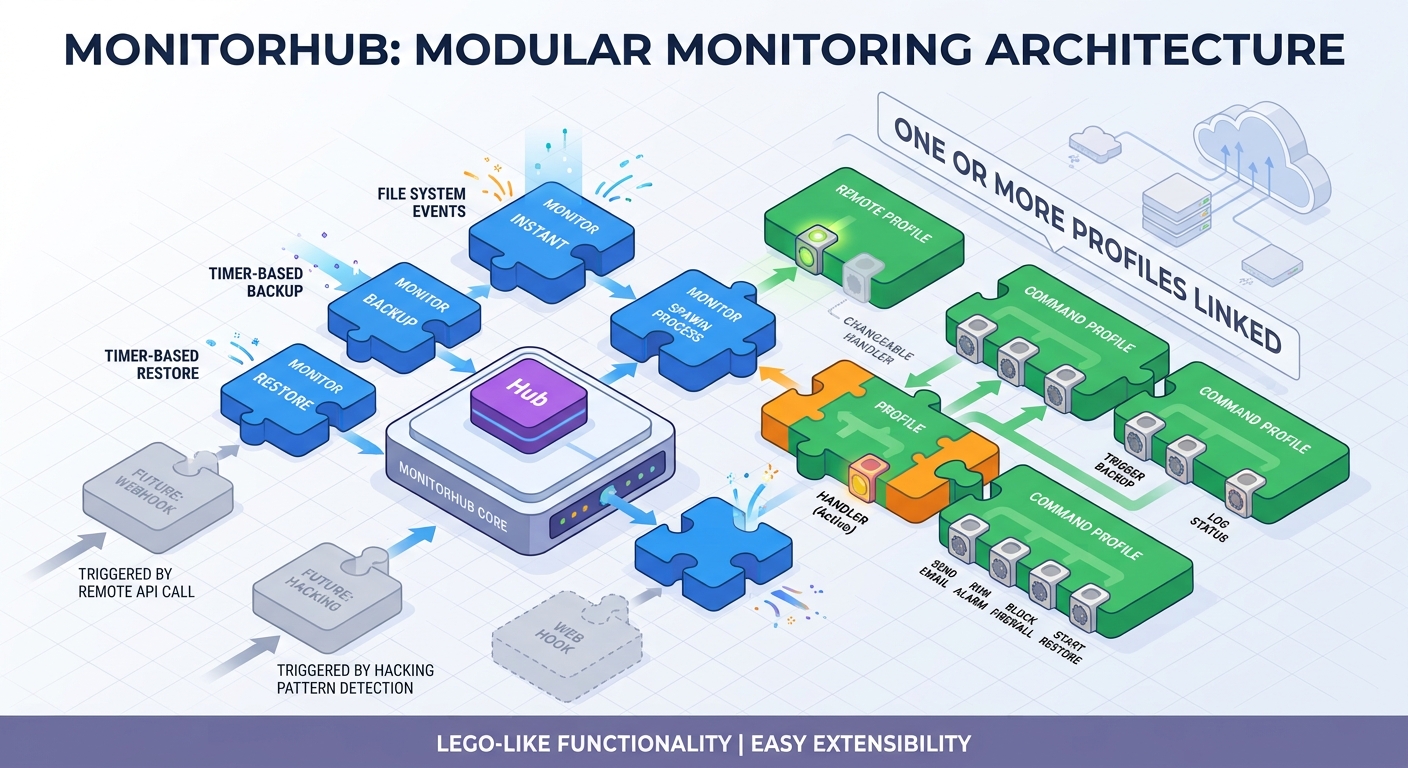
Monitors consume events and profiles trigger handlers
At its heart MonitorHub is like a lego box.
- Monitors are the bricks that consume events. A monitor watches a folder for changes (file system events) or runs on a schedule (timer events), and converts every event into an action. Each monitor runs as a separate process. This isolates monitors from each other.
- Profiles are the bricks that do the work. A profile holds the configuration of a handler, and one or more profiles can be attached to a monitor.
- When a monitor picks up an event —
created,modified,deleted,moved,closedortimer— it hands it to an event dispatcher. The dispatcher queues each event and detaches it to the handlers of all attached profiles. Each handler runs on its own worker thread, so a slow upload or a long-running command never blocks other events.
Monitors are independent processes: each monitor can be started and stopped individually, runs with its own logging, and can be attached to any number of profiles.
Monitor types available today
- Instant monitor — watches a folder and immediately uploads every changed file to the remote destination. Ideal for security-camera footage, documents, or any folder that must be copied the moment a file changes.
- Backup monitor — copies the local folder to the remote destination on a schedule.
- Restore monitor — copies the remote destination back to a local folder on a schedule.
Extensible by design — a real lego box
The architecture is deliberately pluggable. Adding a new capability means adding one brick, not rewiring the box:
- A new monitor type? Write one new class that implements the monitor contract and register it in the monitor registry — a single
register()call. All the plumbing (event loop, dispatcher, profile handling, logging, process lifecycle) is already in place. For example, a webhook monitor is just one newWebhookMonitorclass registered with an action handler. - A new remote storage provider? Write one handler class implementing the remote contract (copy, delete, restore) and add one entry to the handler table. The profile editor, the CLI, the dispatcher and the whole runtime start using it automatically.
- A new event type? Handlers are configured per profile with event filters, so new events can be routed to any mix of handlers without code changes.
Profiles, monitors and their mappings are stored in a local SQLite database, managed through simple commands: mhub profile new, mhub monitor new, mhub monitor start.
Extreme scalability
There are no limits to the scalability of MonitorHub on your LAN and on Cloud Servers.
Use Case: multi hop propagation
For example, one MonitorHub instance (MH1) is running on a server without internet access. Another MonitorHub instance (MH2) is running on a server with internet access.
Whenever there is a file change on MH1 an instant monitor triggers an FTP file transfer to server MH2. Instance MH2 has an instant monitor running that immediately propagates that file to a cloud storage provider.
Use Case: server failure detection
In this use case MH2 checks regularly a file with a time stam. If the timestamp is more that say 2 minutes old than we send an alarm to the administration.
Implementation details:
- Scheduled monitor on MH1 uploads every minute a file to MH2 server.
- Scheduled monitor on MH2 runs every 90 seconds and runs a script to check the updated time stamp.
- If update timestamp is more than 1 minute the script sends a notification to the administrator who can take action
Remote profiles — any storage provider
A remote profile stores the configuration of a remote storage provider.
- S3-compatible cloud storage out of the box — a built-in S3 handler works with Amazon S3, Cloudflare R2, IDrive E2, Backblaze B2, Oracle Cloud Object Storage, IBM Cloud Object Storage and any other S3-compatible provider.
- Everything else through rclone — the Swiss knife of cloud transfer. Remote profiles for Google Drive, Microsoft OneDrive, FTP, SFTP, WebDAV and many other backends are delegated to rclone automatically. MonitorHub owns the profile configuration — no manual
rclone.confediting needed — and passes credentials to rclone through a per-process environment, so secrets never appear on the command line. - Import existing rclone profiles —
mhub profile importreads an existingrclone.confand lets you choose which profiles to bring over. - Choose the route per profile — every remote profile records which handler it routes through (
remote_handler), so the same S3 profile can use the fast built-in handler or hand transfers over to rclone when you want rclone's advanced tuning.
Command profiles — run commands and scripts
A command profile runs a shell command or script in response to events on any monitor — a powerful building block for automation.
Typical uses: send an alert (email, SMS, webhook, chat notification), lock down a firewall port in response to an intrusion, or launch an external program or pipeline.
The command template supports placeholders that are replaced with event details before execution: the monitor name, the profile name, the event type (created, deleted, modified, moved, closed, timer) and the source path.
Safety is built in:
- Commands run without a shell by default to prevent shell injection (opt-in enables pipes and redirects).
- Restrict the profile to specific events only.
- A cooldown interval suppresses repeat firings and a timeout bounds each run.
- A worker pool with a FIFO queue bounds concurrent commands — events are never dropped.
Command profiles can also fire on timer events of scheduled monitors, so they can drive backup and restore workflows too.
Use cases
Consolidate cloud storage into a single local repository
The family is on holiday and each phone uploads photos to a different cloud account. Set up one restore monitor with a profile for each cloud provider — when everyone gets home, all photos and videos are already on your media server, ready to watch on the TV.
Intrusion detection
Monitor critical folders and honeypot files. On a change, a command profile can trigger an alarm by email, SMS or Discord — and fire a job that instantly blocks firewall access to the server.
Ransomware protection
Use an instant monitor to backup up important files to a versioned cloud provider. If ransomware strikes, restore any previous file version in minutes.
Regardless of versioned cloud provider you should have a 3 generations of backups. For example daily, weekly and monthly backups to 3 different destination folders. Backup monitors are ideal for creating a daily, weekly and monthly backup.
GitHub repository
For more information see: README on GitHub
© copyright 2026. All Rights Reserved